
by Tony Zeoli | May 25, 2016 | Updates
The world of WordPress theme development has advanced over the years to give small business owners an incredible array of options to layout and style their WordPress blogs, websites, and ecommerce stores at minimal cost. In the past, theme development was costly. Building themes from scratch and writing all the rules of how a how a theme should function or how it should be laid out needed to be planned, designed, and coded from scratch. Today, theme frameworks, the new WordPress “Customizer” (introduced in WordPress 3.4), and “child themes” make it far easier to develop custom themes that are visually exciting while also including additional functionality using javaScript (or variations of javaScript, like jQuery, Backbone, or Node).
Every year since 2010, WordPress has released a default theme that is added to the Theme management panel in your WordPress install. These themes are usually white background and black text – so they are literally a blank slate for you or your developer to color around the lines. They are called frameworks, because they already include the complete layout and rules about how to handle font sizes, font colors, rollovers, bullet points, block quotes, featured images, and overall page layouts. It’s sort of like a coloring book. You get the book and there are already sketches available for you or your child to apply a design aesthetic using crayons or colored pencils.
As we’ve learned how themes should be developed, we’ve coalesced around the concept of standardization. The commonalities in theme development are applied in theme frameworks, allowing theme developers to focus on style and advanced functionality, rather than writing the same line of code across multiple themes to display something as common as a post title, post excerpt, or featured image. In addition, today’s theme framework developers have also advanced the idea of page builder templating tools, which provide a website owner with the ability to add a homepage carousel themselves or layout the home page as columns and rows with blocks of content by replacing the WordPress post engine and making the layout look more like a website than a blog. While theme frameworks make it easy for theme developers to create custom themes, they are inherently complex themselves. The developers of these frameworks are providing a toolset for general theme development and they must be able to push new versions with bug fixes, security patches, or new features requested by users. Disconnecting a framework from its developer prevents the developer from providing these important updates.
At Digital Strategy Works, we keep finding very capable theme developers taking default WordPress themes that ship with WordPress (or other popular theme frameworks) and hacking them to create new custom themes. We have a huge problem with this. When a developer takes a pre-built theme framework (ex. WordPress 2016 that ships with WordPress as its default theme), hack it, and rename it, they disconnect the theme from being updated by the original theme author. In this case, WordPress themselves! We need to maintain that connection to the theme developer who will push new releases, because themes must maintain their connection to their originator to take those updates.
You may be asking the question, “well, if theme developers aren’t supposed to hack and rename theme frameworks, then how can they do theme development?
The answer is, child themes!
What is a child theme? It is a theme that is the child of a parent. In web development, we use parent/child relationships to define when something is primary and when something else is directly related to primary. Want to know more about parent/child relationships in web development? Here is a good review of parent/child relationships in CSS on the Lorelle.WordPress.com blog.
If the parent theme framework contains all the pre-set rules, you can create a child theme of the parent theme with it’s own set of rules that override the parents without actually changing any code in the parent theme, which is the master framework. For example, if a font color for a hyperlink in your parent theme is defined as blue in the parent’s CSS style sheet. You can create a new CSS style sheet in the child theme and define the link color as red. You never touched the original CSS file and that rule for the link color, but your child theme’s CSS file rule will override the parent theme rule and make the color of the link red, instead of blue.
Another function of child themes is the ability to add a functions.php file inside your child theme, then add additional functionality to your parent theme, without overwriting its own functions.php file. A functions.php file contains some of the more complex rules around how your theme actually functions. If a developer writes functions into the functions.php file of the parent them, any new update from the original developer will wipe out that code. That’s why it’s important to add functions to the child theme functions.php file and not the parent’s functions.php file. Make sense?
We don’t want anyone touching the parent theme framework and all the underlying code. We want to create a child of the parent, which simply overrides CSS styles or adds additional function logic to the parent them without actually touching the parent theme files themselves.
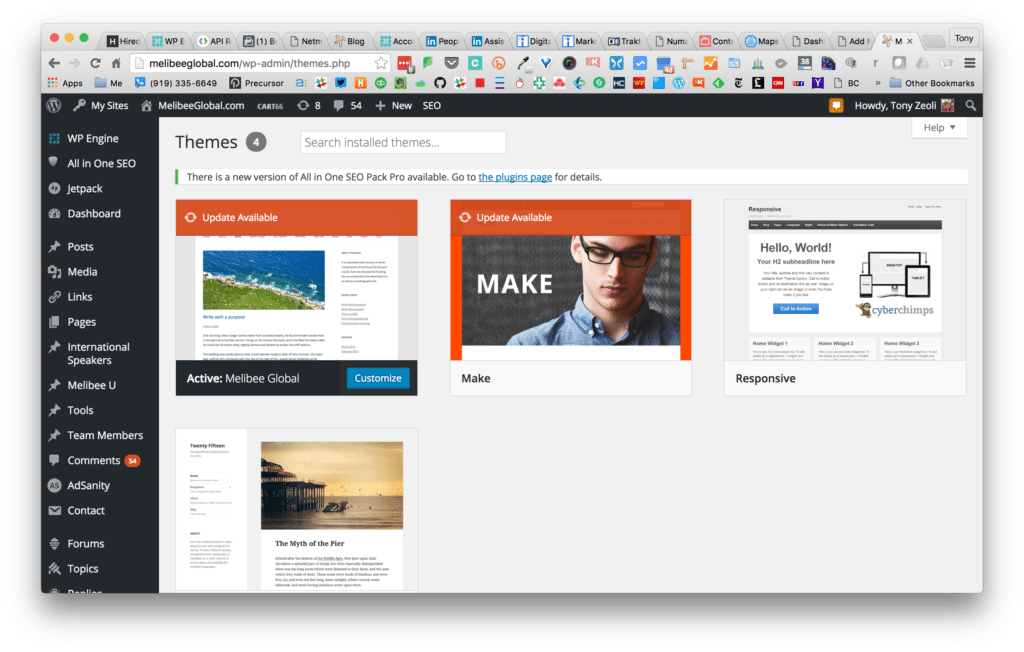
Example: Name of the theme is the business name and shows an update available.
How do you know if your developer has hacked a theme framework and left you with a theme that cannot be updated? That’s difficult for the non-technical small business owner or a non-technical employee managing WordPress sites for a large business to know. However, you can login to your WordPress admin Dashboard, navigate to Appearance > Themes, and check the active theme. If the theme does not have a name or if the theme is the name of your business (like the example shown above, which is common practice), your theme may suffer from being disconnected to its original developer. Notice in the example that the image for the theme is not the actual image of the site itself. It’s still the image of the WordPress theme framework that was modified. If it were the child theme, then it might have the correct screenshot of the website homepage. If the theme was renamed as your business name or doesn’t have a name, but does show that it can be updated – DO NOT UPDATE! You will overwrite your theme files with the update and break your site.
Warning: Don’t try this unless you have daily backups and you’re working in your staging (alternative development environment)
To test the theory that your developer took a theme framework, hacked it, and renamed it without using a child theme, you need to push your live site into a staging environment and then update the active theme. You should always backup your files before you make any updates. Some hosting companies provide daily backups, while on others you must use a plugin for WordPress like Backup Buddy to backup your site to somewhere (like DropBox or Google Drive) other than where your WordPress files are hosted. I mean, why backup to the same folder on your host that WordPress is on? If you ever have an issue, not only is your site lost, but your backups are too!
If you have a website and your WordPress developer left you without the ability to update your theme, then contact us today. We can help convert what your original developer left you with into a child theme of a recent theme framework (we use the Make Theme Framework by Theme Foundry) and then you’ll be able to take theme updates without having to worry about breaking your site.
Tony Zeoli founded Digital Strategy Works to provide small and medium size businesses with end-to-end digital strategy consulting. With over 16+ year of experience working on digital media projects for start-ups, non-profits, institutions, and corporations, Zeoli brings a wealth of experience that cuts across the digital media spectrum.

by Tony Zeoli | Nov 7, 2014 | Updates
Digital Strategy Works, an Asheville web design and web development company building websites for our clients exclusively on the open source WordPress content management system, is pleased to announce the launch of legendary house music DJ, Tony Humphries website and social media strategy. We worked with Tony’s U.S. booking agent, Kelly Cooke of KC Management to plan, develop, and launch Tony’s new website located at the URL: https://tonyhumphries.com (screenshot below).
We also worked to developed a comprehensive SEO and Social Media strategy, which included installing and configuring All In One SEO Pro, the best WordPress SEO plugin. All In One now comes with a Social Meta panel that allows the site admin to manage what images or text Facebook’s Open Graph protocol pulls from the home page or any post or page. In addition to WordPress stats, we also connected Tony’s site to Google Analytics and linked the site map generated by All In One SEO to Google Webmaster Tools. Of course, we set up Tony on Google Business Apps with hosted “tonyhumphries.com” email
Given all the changes to Facebook over the years to move musicians and bands from personal profiles into Business Pages, Tony’s Facebook world was awash in duplicate personal profiles and managed business pages. We worked directly with our colleagues at Facebook Music to collapse Tony’s Facebook presence in one “verified” Musician/Band page: https://www.facebook.com/tonyhumphriesofficial. And, in doing so, we were able to merge Likes from various Pages into the primary page, while also collapsing two personal profiles into one, and moving Followers to Likes on the new primary Musician/Band page (screenshot below)

Tony Humphries Official Verified Facebook Page
Tony’s visibility on Twitter was low, so we worked to build Follows and bring that presence (@tonyhumphries) in line with his Facebook persona. We also learned that someone registered a Tony Humphries profile on MixCloud. We worked directly with MixCloud to ensure that Tony could control that profile. His new, official MixCloud profile is now: https://www.mixcloud.com/tonyhumphries.

Tony Humphries Mixcloud Profile Page
To ensure that domain squatters wouldn’t sit on his domain in the UK and Italy, we registered domains in those territories and additional domains here in the USA, then redirected all to his primary website address.
Powered by WordPress, the most open source content management system, the website is connected to WordPress.com through JetPack, which includes options for social sharing and other important tools . We selected WP Engine, one of the top WordPress managed hosting services, to host the website and take advantage of native caching, as well as benefit from their complete staging and production management system and daily snapshot backups.
In addition, we submitted a Wikipedia entry on Tony’s behalf currently being as a draft. For those interested in contributing to Tony’s Wikiepedia entry, please follow this link.
We are proud to have worked on this project with Tony and Kelly, as music and DJ culture has been a focus of DSW founder, Tony Zeoli’s life for over three decades. To assist a legend work out his online presence has been a gift and we are grateful. We hope the new TonyHumphries.com continues to educate new DJs and dance music performers worldwide on the power and gospel of house music through the eyes and ears of Tony Humphries.
Are you a DJ, musician, or band looking to build a WordPress website? Do you have a need to develop a sound social media strategy? If so, Digital Strategy Works can help. Contact us today for a free, 1-hour consultation over the phone or by Google Hangout or Skype.
Tony Zeoli founded Digital Strategy Works to provide small and medium size businesses with end-to-end digital strategy consulting. With over 16+ year of experience working on digital media projects for start-ups, non-profits, institutions, and corporations, Zeoli brings a wealth of experience that cuts across the digital media spectrum.
by Tony Zeoli | Sep 15, 2014 | WordPress Hosting
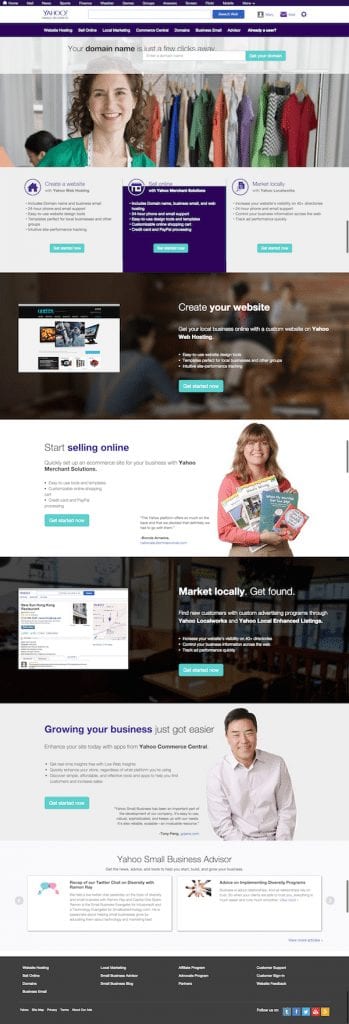
Here at Digital Strategy Works, we are frequently asked about hosting. We have our favorites. WP Engine, MediaTemple, Page.ly and SiteGround come to mind, but we frequently talk clients who signed-up long ago with Yahoo! Small Business for both domain management and hosting needs. Those early decisions to use a company like Yahoo! for hosting WordPress sites were easy to make. You knew Yahoo! as your email provider and trusted that Yahoo! could also provide quality hosting and support. In some cases, that is true. One can get decent, cheap hosting from the company and they’ll manage your domain name entry for you all under one roof. That’s fine for a pure HTML site, but when it comes to a dynamic content management system like WordPress, you should avoid Yahoo! at all costs.
First, Yahoo! should not be in the hosting business at all. Yes, we said it was fine above, but really? Yahoo!? Hosting? Why?
At one point in time, someone at Yahoo! thought, “we need to be in that business to compete with GoDaddy and Amazon! (or other services for that matter)” But that’s not what Yahoo! does best. Under its new leadership, Yahoo! is becoming a content company and their hosting services lag far behind all managed WordPress hosting companies today.
Right now, we’re working on redirecting one of our client’s domains that is registered at Yahoo! Small Business to a new site hosted on Blue Host’s servers. We’re not big fans of Blue Host either, but that’s what we’re dealing with. When we logged into Yahoo! SMB’s Hosting control panel, we saw this message:
Important Announcement: Required Upgrade to WordPress version 3.9.2
- There are possible security issues with older versions of WordPress. To prevent any issues please upgrade to the latest WordPress version 3.9.2. This is a mandatory action that must be completed by Monday, September 15, 2014. After this date, we will automatically upgrade all WordPress sites to the latest version.
- Additionally, we suggest you take the following actions to further enhance security:
- If you have custom installations, the upgrade to WordPress 3.9.2 may cause unexpected changes to your site. It is recommended that you upgrade prior to the deadline to provide yourself adequate time to plan for any potential fixes. The following WordPress article can help you through the process: https://codex.wordpress.org/Upgrading_WordPress_-_Extended_Instructions. While we do provide the technical infrastructure you need to run WordPress (PHP and MySQL), we cannot offer technical support or a warranty as WordPress is an open-source service.
Okay, Yahoo!. Thanks for the message about removing plugins and installing Total Cache and All In One WP Security, the latter of which we’ve never used. We use Brute Protect to prevent spam bot attacks and Sucuri Security for malware and auditing of our WordPress sites. Brute Protect is so powerful, the plugin was recently acquired by the Automattic for inclusion in the Jet Pack plugin, which features a combination of high level plugins written by the WordPress team themselves.
Where is Yahoo! on Brute Protect? They’re still lagging far behind. And, they’re still advocating for upgrading to WordPress 3.9.2! Wait! We’re now on WordPress 4.0! Come on Yahoo!, wake up! What happens with enterprise companies like Yahoo!, is they cannot move as fast as smaller hosting companies that will test and approve new versions of WordPress weeks after their releases to the public.
The latest version of WordPress: 4.0, comes with a great new feature that allows the blog author to keep their editing tools persistent while writing posts. There are other advancements in the media library and using oEmbed to embed social links from YouTube, SlideShare, MixCloud, SoundCloud and other services, so one doesn’t need to rely on plugins anymore to embed 3rd party widgets that do stuff. But where is Yahoo! on this? Late, that’s where. While the entire world outside of Yahoo! is updating to 4.0, Yahoo! is still recommending 3.9.2.
Okay, so we’ve talked about how late Yahoo! is on WordPress versioning. There are many other problems with Yahoo! hosting for WordPress, but the most pressing problem is the removal of .htaccess from the root directory of WordPress installs. Why is .htaccess so important? First, how can you install Total Cache if you don’t have .htaccess, for Total Cache relies on .htaccess to insert its caching rules! That goes against the statement listed in their admin hosting panel!
Here is what Yahoo! says about .htaccess:
.htaccess (Hypertext Access)
The name .htaccess refers to the main configuration file for Apache, a popular open-sourceHTTP server. The .htaccess file can be used to create custom error pages and web page redirects, set up password protection, enable SSI, and more. Yahoo does not currently allow you to upload .htaccess files to your account. For other customization options, we recommend the custom Error Pages and password-protection features available in your Web Hosting Control Panel.
That’s great. No .htaccess file, so we can’t even write redirection rules in the .htaccess file manually, nor can we employ a redirection plugin, which will write the rules for us. Redirection rules help site owners redirect posts, pages and other links as 301s (forwarding permanently to a new URL) or 401s (not available). Yahoo! offers the “custom Error Pages tool,” but who is going to add HTML files to a WordPress folder and then set some rules in those pages, which aren’t explained in their help section other than to refer you to the tool. You have to be a developer to understand and utilize it and not a general site owner or editor, who could accomplish this themselves with a redirection plugin!
Not only does Yahoo! not allow .htaccess. Yahoo! also restricts users from increasing the memory limit of their WordPress installation. Meaning that if you install a set of plugins and find yourself needing a big more php memory to help fuel your site’s processing needs, forget about it. Call support and plead with them and they will say, sorry, we don’t allow that. WordPress at a minimum, I believe the last time I check required 40MB of php memory. Need to increase that to 64MB, well, you’re out of luck.
We also found out that we simply can’t redirect a URL in the Yahoo! Domain Manager settings. We found the instructions here: https://help.yahoo.com/kb/yahoo-domains/learn-set-domain-forwarding-sln17950.html
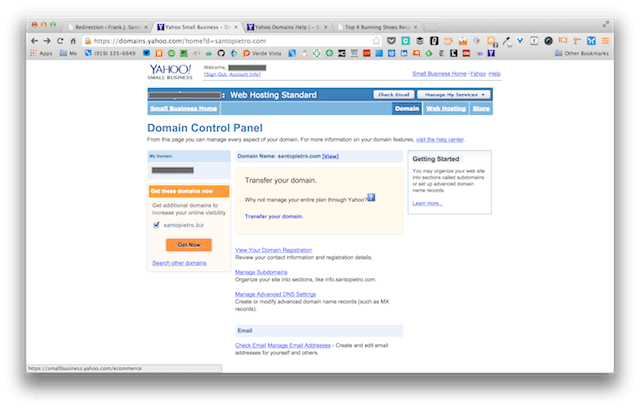
Yahoo! Domain Control Panel screenshot
It says something about these services being available to Yahoo! domain and business mail customers, but my client is a domain customer! Where we do the redirect, we don’t know. Now, the client has to call Yahoo! and learn why they can’t do something that you can do in most other services easily.
Lastly, in today’s world of WordPress hosting, even GoDaddy is getting into managed WordPress, where you don’t have to use the one-click install. WordPress is simply there when you login. That’s it. No one-click. No fuss. You see this now at WP Engine, which does a fantastic job of powering WordPress managed sites that also come with staging environments, so you can build a site in staging and then push it to live with one click. Most site with small businesses work on their LIVE site, not a staging site. It means the changes you are making to your live site are seen by all. With WP Engine, you’ll get a staging environment relatively easy to deploy and work with. Why would anyone use Yahoo! if they could use WP Engine, who deploy this functionality to every site owner? Answer – you wouldn’t. You would go right to WP Engine!
Do yourself a favor. Get off Yahoo! Small Business Hosting and move today! Need help. We can do it for you. Contact us and we’ll move your WordPress site from Yahoo! SMB to WP Engine today! You’ll get managed hosting where they do the upgrades for you! You’ll get a fantastic admin user experience. And, you’ll get peace of mind knowing that you’re not hosting with a dinosaur, but a nimble startup in Austin, TX who are working on WordPress all day, everyday.
Tony Zeoli founded Digital Strategy Works to provide small and medium size businesses with end-to-end digital strategy consulting. With over 16+ year of experience working on digital media projects for start-ups, non-profits, institutions, and corporations, Zeoli brings a wealth of experience that cuts across the digital media spectrum.

by Tony Zeoli | Jun 2, 2014 | Presentations
Over the weekend, Digital Strategy Works founder, Tony Zeoli, presented at WordCamp Asheville 2014 on How To Find and Work With a WordPress Developer.
He’s adapted the title a bit to include both designer and developer, simply because both are critical to the custom WordPress development process. Below, you can find Tony’s deck, which is also posted to Slideshare. Please share this along to those you think will benefit from it.
All WordCamp Asheville slide decks are available here: https://2014.asheville.wordcamp.org/2014/06/01/speakers-presentation-links/
Tony Zeoli founded Digital Strategy Works to provide small and medium size businesses with end-to-end digital strategy consulting. With over 16+ year of experience working on digital media projects for start-ups, non-profits, institutions, and corporations, Zeoli brings a wealth of experience that cuts across the digital media spectrum.

by Tony Zeoli | May 28, 2014 | Updates
Digital Strategy Works recently completed a fully responsive website for OneBeat.tv, a popular online EDM channel. The site renders in both web and mobile browsers, making it easily readable for site visitors.
OneBeat requested a grid like layout that relies on images, titles and categories to lead all posts. Generally, these types of themes hide the title behind a rollover in the center of the image over a transparent graphic. However, the task was to build the layout and functionality, so that the post title fit into respective blocks on the page. To do so required the addition of a two tiered titling system, because it’s difficult to limit WordPress (or the web producer publishing the content) from displaying multiple categories on any given post.
We wrote a text entry field for the post title on its single post page and gave the post author the ability to write a secondary title for the homepage or category landing page. A social media bar is present across the top of the site to link site visitors to the company’s social profiles. We also provided the ability to limit the post category on the homepage to a single category, as WordPress usually prints all selected categories resulting in multiple categories stacked in a very small post box. It was a complex mission that we solved with a solution to tag a post with one of multiple categories, making the selected category primary.
As you can see, the posts fall into a layout that mimics a wall of bricks, each with a different width. We employed masonry.js, a popular javascript library to accomplish this layout and it generally works nicely with some minor caveats, which will be resolved in the next version.

Home Page – OneBeat.tv with grid layout
On the post page, the requirement was to have the lead be either an image, a video, a gallery or…nothing at all. We built a tool to allow the post author to insert a media type above the post at a fixed width. However, this image could not be “Featured” in the sense that WordPress takes a featured image from the Featured widget in the post admin and displays that image in the home page box, a category landing page or other areas. OneBeat wanted to be able to have 2 featured images – one for the post and one for everywhere else. And, the featured area needed to be a fixed size, so that the post author did not publish something out of scale with the rest of the site. Consistency of brand and message is critical for a blog or website, so that the reader always knows what layout to expect. The decision to make this area fixed width and height would keep a site wide consistency that is required in professional publishing.
In addition, we pulled in the OneBeat Twitter feed, set up a MailChimp email harvesting tool in the sidebar and gave them the ability to customize the sidebar with recent, relevant posts.

OneBeat.TV post page
Tony Zeoli founded Digital Strategy Works to provide small and medium size businesses with end-to-end digital strategy consulting. With over 16+ year of experience working on digital media projects for start-ups, non-profits, institutions, and corporations, Zeoli brings a wealth of experience that cuts across the digital media spectrum.


