by Tony Zeoli | Apr 20, 2026 | AI, Maintenance & Security
There’s a task that every WordPress developer knows intimately — the weekly ritual of logging into each client site, running updates, taking notes, drafting an email, and sending it off to the client with a summary of what changed. If you manage one site, it’s a minor inconvenience. If you manage ten, fifteen, or twenty, it becomes a significant portion of your week — repetitive, manual, and completely unscalable.
For years I handled it the old way. Log in. Update. Screenshot. Write up. Send. Log out. Repeat. I had looked at services like ManageWP that centralize multi-site WordPress management, but the subscription costs stack up quickly when you’re running a boutique agency, and the tradeoff between cost and control never felt right for how I work.
Then I discovered Claude.
A Different Kind of Coding Partner
I’d been using AI tools in my work for a while — Sumo AI had been part of my workflow for content production — but I’d never applied AI to a WordPress development project. When I started thinking seriously about building my own maintenance plugin, I decided it was the right opportunity to find out what working with Claude on a real, production-grade WordPress plugin actually looked like.
What I found surprised me. Claude wasn’t just a code generator. It was a genuine development partner — one that could explain why a piece of code worked a certain way, catch problems before they became bugs, and push back when I was heading in the wrong direction. When I described what I needed — a plugin that would manage updates, log every action, send branded email reports to clients, and handle spam filtering — Claude didn’t just produce code. It helped me think through the architecture, suggested the right WordPress APIs to use, and flagged patterns that would cause problems later.
For someone who knew enough about WordPress to know what I wanted but not always how to build it at the level of quality I needed, this was transformative.
From Spreadsheet to Software: What the Plugin Does
The core problem Greenskeeper solves is the gap between WordPress’s built-in update screen and what a professional agency actually needs when maintaining client sites.
WordPress’s Updates screen tells you what needs updating and lets you apply those updates. What it doesn’t do is keep a searchable log of everything that happened, build a branded email report for your client, handle SMTP delivery so the email actually arrives, or give you a layered spam filter with a audit trail. You either cobble that together yourself — spreadsheets, email drafts, copy-paste — or you pay for a managed service.
Greenskeeper bridges that gap in a single plugin. It manages Core, plugin, and theme updates in separate sections with per-item checkboxes and a real-time progress bar. Every update is automatically logged to a session history with success and failure details. After running updates, one click builds and sends a branded HTML maintenance report to your client — your agency logo, your company name, the full list of what was updated, any notes you want to include, and a spam activity summary if you’re using the built-in filter.
The spam filter itself is a two-layer system: local rules (honeypot fields, submission timing, link counting, keyword and IP blocklists) backed by optional Akismet cloud filtering. There’s a full Spam Log page showing every blocked attempt with one-click IP blocking. And because agencies run on different server infrastructure, there’s built-in SMTP configuration supporting nine providers — SendGrid, Mailgun, Brevo, Gmail, Microsoft, and more — so you never have to add a separate SMTP plugin.
On multisite networks, the plugin adds a Site Scope Selector across every management page so you can view and manage any single site or the full network from Network Admin.
The Name That Wasn’t Generic Enough
The plugin didn’t start life as Greenskeeper. It started as Site Maintenance Manager.
When I submitted the plugin to the WordPress.org directory for review, the team came back with feedback that the name was too generic — too close to existing tools and not distinctive enough to stand on its own. They were right. “Site Maintenance Manager” described what the plugin did, but it didn’t say anything about who built it or why it was different from anything else.
Claude and I worked through the naming problem together. I wanted something that captured the idea of careful, methodical maintenance — the kind of invisible, expert work that makes everything run smoothly for everyone else. We landed on Greenskeeper.
In golf, the greenskeeper is the professional responsible for maintaining the course — the fairways, the greens, the hazards, every inch of the 9 or 18 holes that players take for granted because they’re always in perfect condition. The greenskeeper works early in the morning before anyone else arrives, fixes what needs fixing, and disappears before the first tee time. Nobody thinks about the greenskeeper when the course is in great shape. That’s exactly the point.
That’s what a good WordPress maintenance workflow should feel like for your clients. They never think about updates because you’re handling it. Everything just works.
The WordPress plugin team accepted the new name, reserved the slug, and the plugin is now in review at wordpress.org/plugins/greenskeeper.
Building in Public: The GitHub Repository
Throughout development, Claude also taught me how to manage the project properly in version control. I hadn’t previously worked with a GitHub repository dedicated to a single WordPress plugin, and setting up the right structure — folder naming, the main plugin file, the readme.txt format that WordPress.org requires, branch management — was all new territory.
The plugin is now maintained in its own public repository at github.com/digitalstrategyworks/greenskeeper, where every version is tracked, documented, and available. The repository includes both a GitHub-formatted README with full feature documentation and a WordPress.org-format readme.txt with installation instructions, FAQs, an external services disclosure, and a complete changelog going back through every release.
Having a properly maintained public repository matters for more than just version control. For a plugin heading toward WordPress.org listing, it signals to potential users and contributors that the project is actively developed and professionally maintained. It’s also where the issues log lives — a useful feedback channel as the plugin moves from internal use toward public availability.
The Problems We Solved Together (And Why They Matter)
Building a production-quality WordPress plugin means navigating a set of requirements that go well beyond “does it work.” The WordPress.org review team maintains strict standards for security, coding practices, and documentation — standards that exist because plugins run on hundreds of millions of websites and a single vulnerability or poorly-written query affects everyone.
Several of the issues we resolved together speak directly to the broader WordPress ecosystem:
Premium plugin deactivation. This was the most critical bug we found. When Greenskeeper attempted to update a premium plugin like Gravity Forms, ACF Pro, or Sucuri, the plugin would sometimes be deactivated after the update ran. The root cause was subtle: premium plugin vendors generate signed, time-limited download URLs that can expire between the moment the update scan runs and the moment the actual upgrade fires. When WordPress’s upgrader receives a 401 or 403 response trying to download from a stale URL, it calls deactivate_plugins() as part of its own error recovery — standard WordPress behaviour, but catastrophic in this context. The fix was to check whether the package URL is still valid before attempting the upgrade, and if it isn’t, force a fresh wp_update_plugins() call to get a new signed URL from the vendor’s server — exactly what WordPress core does before its own upgrade process. Any plugin that triggers WordPress updates programmatically needs to handle this correctly.
$_SERVER variable sanitization. The WordPress.org review team flagged that $_SERVER variables — HTTP_USER_AGENT, HTTP_REFERER, REMOTE_ADDR — were being used without sanitization in the spam filter’s Akismet integration. Although these come from the server environment rather than user form input, they can be manipulated by the sender of the request and must be treated as untrusted input. This is a common oversight in plugin code across the ecosystem and something the review process correctly catches.
Prepared SQL statements. Several database queries were using table name variables in ways that the static analysis tools couldn’t verify as safe, even though the values came exclusively from $wpdb->prefix plus fixed strings. The fix — wrapping table names with esc_sql() at the point of variable assignment — addresses the checker’s concern and is the correct defensive pattern for all custom table queries in WordPress.
External services documentation. The plugin connects to Akismet’s API for optional cloud spam filtering. WordPress.org requires that any external connection be fully documented in the readme: what service it is, what data is sent, when it’s sent, and links to the service’s terms of service and privacy policy. This requirement exists to protect users — they should always know exactly what data their installed plugins are transmitting and to whom. Adding a complete == External Services == section is now part of the plugin’s submission package.
Batch update timeout handling. On shared hosting environments, running updates on multiple plugins in sequence was failing after the first item with a generic “Request failed” error. The cause was a combination of jQuery’s default AJAX timeout (which has no explicit limit and varies by browser) and PHP’s max_execution_time being hit on slower servers. The fixes — switching to $.ajax() with an explicit 120-second timeout, adding an 800ms delay between sequential updates, and calling set_time_limit(300) in the PHP handler — ensure that updates complete reliably on the hosting environments where agency clients actually live.
What’s Next for Greenskeeper
The plugin is currently v1.9.7 and in review at WordPress.org. Once it’s approved and listed in the directory, the next development phase focuses on a Pro tier through Freemius integration.
The first Pro features planned include scheduled automatic updates — so maintenance runs on a cron schedule without anyone needing to log in — and a Performance Reporting module that pulls Google PageSpeed Insights data and includes a performance summary in the client email report. These are capabilities that agencies currently pay for through managed services like ManageWP, and building them into a self-hosted plugin means you own the workflow completely.
There’s also a Plugin Intelligence layer in planning that would manage license status awareness for premium plugins, understand update prerequisites and dependencies, and surface contextual guidance about known update issues before you run them.
What Working With Claude Taught Me
The most important thing I learned from this project wasn’t a specific piece of code or a WordPress API. It was that AI-assisted development works best when you bring your domain expertise and let the AI bring its technical depth — and when you’re willing to push back and ask questions rather than just accepting the first answer.
When Claude made architectural decisions I didn’t understand, I asked why. When a bug turned out to be more subtle than the first fix suggested (the premium plugin deactivation issue went through two rounds before we got the root cause right), we worked through it together until we had an explanation that made sense technically and a solution that would actually hold. When the WordPress.org review team came back with legitimate criticisms, we addressed every one of them and understood the reasoning behind each requirement.
That process — question, understand, fix, understand why — is what produced a plugin I’m confident putting in front of clients.
Greenskeeper is available at github.com/digitalstrategyworks/greenskeeper and will be listed on WordPress.org once the review is complete. If you’re a WordPress developer or agency owner who’s been handling maintenance the manual way, keep an eye on it.
The greenskeeper is almost ready for opening day.
Tony Zeoli is the founder of Digital Strategy Works LLC and Netmix LLC. He has been building on the web since the early days of the internet and currently focuses on WordPress strategy, development, and digital media infrastructure.
Questions or feedback? Reach out at digitalstrategyworks.com.
Tony Zeoli founded Digital Strategy Works to provide small and medium size businesses with end-to-end digital strategy consulting. With over 16+ year of experience working on digital media projects for start-ups, non-profits, institutions, and corporations, Zeoli brings a wealth of experience that cuts across the digital media spectrum.

by Tony Zeoli | Feb 5, 2019 | Custom Wordpress Development, Portfolio
Digital Strategy Works is pleased to announce the completion and launch of a major project we’ve had underway for some time now. Bookstr.com, a New York City-based authors and books blog needed to migrate from Drupal to WordPress for a host of reasons. The company was acquired and its Drupal site was a legacy aspect of prior ownership, but the Drupal site was much more difficult to maintain and upgrade for a small staff without an internal development team. Bookstr made the decision to move off of Drupal and onto WordPress, which would give them a bit more control over updates and maintenance, and provide additional tools for their writers and editors to publish content, create quizzes and polls, and cross post content into social media. And, the All in One SEO Pack plugin for WordPress SEO would allow them to better control their on site SEO, as well as update their Google and Bing sitemaps.
Digital Strategy Works performed the migration from Drupal to WordPress of over 9,000 posts and 40,000 images. Drupal to WordPress migrations at this scale are not easy, because the migration cannot take place from web server to web server. Servers time out after trying to run long processes. The Drupal database must be downloaded and installed on a local machine (your computer). Using a premium plugin and other software, the Drupal content with its associated images could then be migrated into a fresh WordPress install.
The caveat to this migration comes when trying to then upload a heavy WordPress site with thousands of URLs and tens of thousands of images back up to a web sever when the hosting company (in this case, Pantheon) only allows for the client’s account to have a set amount of storage. In the migration process, we learned a great deal about how to migrate Drupal content into a WordPress shell, then move that WordPress site up to its hosting environment. It was no small task. After running the process a number of times, we were able to complete the migration successfully.

Bookstr.com New WordPress Home Page
For this project, we were also asked to take the pre-existing Drupal “theme” and rebuild into a WordPress theme template. In a Drupal to WordPress migration, the Drupal theme that was built for the Drupal platform will not work on the WordPress platform. A new theme had to be created and with additional options for advertising, as well as to fix issues that were broken in Drupal, like Most Popular Posts, a sidebar widget which displays the most popular posts on the site for a period of time. For the redesign, we used the Make Theme by Theme Foundry, which is an excellent theme for publishers, as the base “child theme,” for the site. Make comes with page-builder functionality for custom layouts of pages and posts, as well as the ability to create and distribute widget content in page, posts, and sidebars. We worked with our internal developer and our offshore development partner, Hashtag Systems Inc, to modify a “child theme” built alongside the Make theme framework. Hashtag contributed a great deal to getting the pop-up overlay in mobile and desktop to function properly. And, they helped style the hero post grid carousel for mobile devices, so that posts in the hero banner would look as good in mobile as on desktop.
The old Drupal site did not have an ad management software package, so we installed and configured Ad Sanity, a popular WordPress plugin to help Bookstr manage it’s Google Adsense placements, while also giving the company the opportunity to sell, manage, and track ads sold directly on their site.
In these Drupal to WordPress migrations, redirecting Drupal URLs to WordPress URLs is essential. We were able to export all prior Drupal URLs and match them with their corresponding WordPress URls, so that Google page rank was passed onto the new site.
The final piece of the project was to build a pop-up to help Bookstr capture email addresses for special promotions. And, we assisted the company by adding DMARC to their DNS manager, so that emails originating from the Bookstr.com domain are not seen as spam by companies that black list spammers.
We also armed the client with All in One SEO Pack, the most powerful SEO plugin for WordPress. It’s truly the most powerful professional SEO plugin for anyone who is serious about on-site search engine optimization for WordPress. Given the content mix of Bookstr, the plugin will allow their editorial team to not only plan their SEO strategy, but also manage social meta optimization, as well. Sitemaps were submitted to all the major search engines and we connected Google Analytics to Google Search Console for ease of tracking SEO performance.
Need us to migrate your Drupal site to WordPress? We can help. Just contact us today to discuss your project and get a quote.
Tony Zeoli founded Digital Strategy Works to provide small and medium size businesses with end-to-end digital strategy consulting. With over 16+ year of experience working on digital media projects for start-ups, non-profits, institutions, and corporations, Zeoli brings a wealth of experience that cuts across the digital media spectrum.

by Tony Zeoli | Mar 22, 2018 | PMPress, Videos
Digital Strategy Works founder, Tony Zeoli, talks about team communication. In our daily project management, there can be communication breakdowns that disrupt a project, causing delays and potentially additional costs. Decisions made today need to be thought through and communicated to the entire team, because there are future intangibles that need to be assessed and mitigated against. When team’s fail to communicate, bad things happen. Tony gives an example of a decision point made that has a lasting impact on a project and how to move forward from that decision. Or, whether to go back and do over. This is the challenge of project management, because when you and your team are working virtually, you don’t have the benefit of stopping by a desk for a chat to check in. Watch and let us know what you think.
Watch all PMPress Videos.
Tony Zeoli founded Digital Strategy Works to provide small and medium size businesses with end-to-end digital strategy consulting. With over 16+ year of experience working on digital media projects for start-ups, non-profits, institutions, and corporations, Zeoli brings a wealth of experience that cuts across the digital media spectrum.

by Tony Zeoli | May 25, 2016 | Updates
The world of WordPress theme development has advanced over the years to give small business owners an incredible array of options to layout and style their WordPress blogs, websites, and ecommerce stores at minimal cost. In the past, theme development was costly. Building themes from scratch and writing all the rules of how a how a theme should function or how it should be laid out needed to be planned, designed, and coded from scratch. Today, theme frameworks, the new WordPress “Customizer” (introduced in WordPress 3.4), and “child themes” make it far easier to develop custom themes that are visually exciting while also including additional functionality using javaScript (or variations of javaScript, like jQuery, Backbone, or Node).
Every year since 2010, WordPress has released a default theme that is added to the Theme management panel in your WordPress install. These themes are usually white background and black text – so they are literally a blank slate for you or your developer to color around the lines. They are called frameworks, because they already include the complete layout and rules about how to handle font sizes, font colors, rollovers, bullet points, block quotes, featured images, and overall page layouts. It’s sort of like a coloring book. You get the book and there are already sketches available for you or your child to apply a design aesthetic using crayons or colored pencils.
As we’ve learned how themes should be developed, we’ve coalesced around the concept of standardization. The commonalities in theme development are applied in theme frameworks, allowing theme developers to focus on style and advanced functionality, rather than writing the same line of code across multiple themes to display something as common as a post title, post excerpt, or featured image. In addition, today’s theme framework developers have also advanced the idea of page builder templating tools, which provide a website owner with the ability to add a homepage carousel themselves or layout the home page as columns and rows with blocks of content by replacing the WordPress post engine and making the layout look more like a website than a blog. While theme frameworks make it easy for theme developers to create custom themes, they are inherently complex themselves. The developers of these frameworks are providing a toolset for general theme development and they must be able to push new versions with bug fixes, security patches, or new features requested by users. Disconnecting a framework from its developer prevents the developer from providing these important updates.
At Digital Strategy Works, we keep finding very capable theme developers taking default WordPress themes that ship with WordPress (or other popular theme frameworks) and hacking them to create new custom themes. We have a huge problem with this. When a developer takes a pre-built theme framework (ex. WordPress 2016 that ships with WordPress as its default theme), hack it, and rename it, they disconnect the theme from being updated by the original theme author. In this case, WordPress themselves! We need to maintain that connection to the theme developer who will push new releases, because themes must maintain their connection to their originator to take those updates.
You may be asking the question, “well, if theme developers aren’t supposed to hack and rename theme frameworks, then how can they do theme development?
The answer is, child themes!
What is a child theme? It is a theme that is the child of a parent. In web development, we use parent/child relationships to define when something is primary and when something else is directly related to primary. Want to know more about parent/child relationships in web development? Here is a good review of parent/child relationships in CSS on the Lorelle.WordPress.com blog.
If the parent theme framework contains all the pre-set rules, you can create a child theme of the parent theme with it’s own set of rules that override the parents without actually changing any code in the parent theme, which is the master framework. For example, if a font color for a hyperlink in your parent theme is defined as blue in the parent’s CSS style sheet. You can create a new CSS style sheet in the child theme and define the link color as red. You never touched the original CSS file and that rule for the link color, but your child theme’s CSS file rule will override the parent theme rule and make the color of the link red, instead of blue.
Another function of child themes is the ability to add a functions.php file inside your child theme, then add additional functionality to your parent theme, without overwriting its own functions.php file. A functions.php file contains some of the more complex rules around how your theme actually functions. If a developer writes functions into the functions.php file of the parent them, any new update from the original developer will wipe out that code. That’s why it’s important to add functions to the child theme functions.php file and not the parent’s functions.php file. Make sense?
We don’t want anyone touching the parent theme framework and all the underlying code. We want to create a child of the parent, which simply overrides CSS styles or adds additional function logic to the parent them without actually touching the parent theme files themselves.
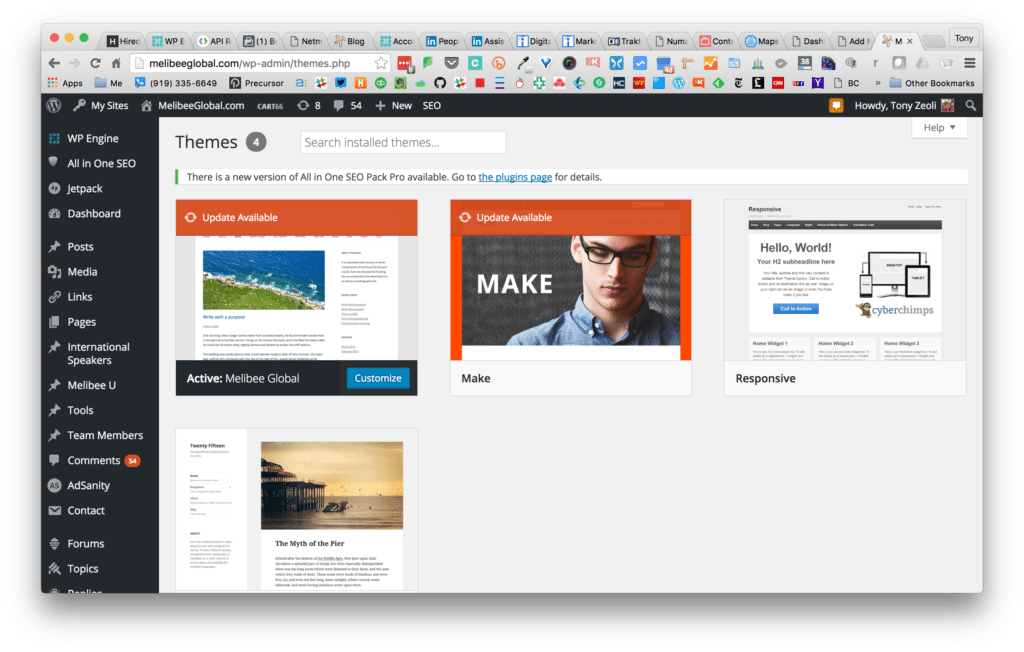
Example: Name of the theme is the business name and shows an update available.
How do you know if your developer has hacked a theme framework and left you with a theme that cannot be updated? That’s difficult for the non-technical small business owner or a non-technical employee managing WordPress sites for a large business to know. However, you can login to your WordPress admin Dashboard, navigate to Appearance > Themes, and check the active theme. If the theme does not have a name or if the theme is the name of your business (like the example shown above, which is common practice), your theme may suffer from being disconnected to its original developer. Notice in the example that the image for the theme is not the actual image of the site itself. It’s still the image of the WordPress theme framework that was modified. If it were the child theme, then it might have the correct screenshot of the website homepage. If the theme was renamed as your business name or doesn’t have a name, but does show that it can be updated – DO NOT UPDATE! You will overwrite your theme files with the update and break your site.
Warning: Don’t try this unless you have daily backups and you’re working in your staging (alternative development environment)
To test the theory that your developer took a theme framework, hacked it, and renamed it without using a child theme, you need to push your live site into a staging environment and then update the active theme. You should always backup your files before you make any updates. Some hosting companies provide daily backups, while on others you must use a plugin for WordPress like Backup Buddy to backup your site to somewhere (like DropBox or Google Drive) other than where your WordPress files are hosted. I mean, why backup to the same folder on your host that WordPress is on? If you ever have an issue, not only is your site lost, but your backups are too!
If you have a website and your WordPress developer left you without the ability to update your theme, then contact us today. We can help convert what your original developer left you with into a child theme of a recent theme framework (we use the Make Theme Framework by Theme Foundry) and then you’ll be able to take theme updates without having to worry about breaking your site.
Tony Zeoli founded Digital Strategy Works to provide small and medium size businesses with end-to-end digital strategy consulting. With over 16+ year of experience working on digital media projects for start-ups, non-profits, institutions, and corporations, Zeoli brings a wealth of experience that cuts across the digital media spectrum.
by Tony Zeoli | Sep 15, 2014 | WordPress Hosting
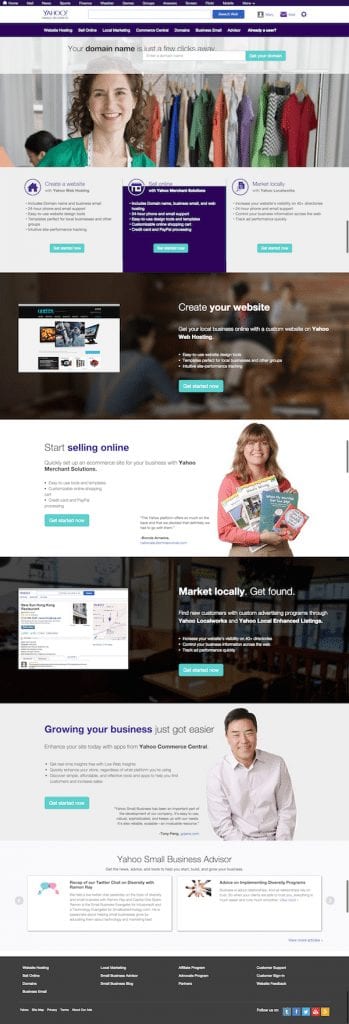
Here at Digital Strategy Works, we are frequently asked about hosting. We have our favorites. WP Engine, MediaTemple, Page.ly and SiteGround come to mind, but we frequently talk clients who signed-up long ago with Yahoo! Small Business for both domain management and hosting needs. Those early decisions to use a company like Yahoo! for hosting WordPress sites were easy to make. You knew Yahoo! as your email provider and trusted that Yahoo! could also provide quality hosting and support. In some cases, that is true. One can get decent, cheap hosting from the company and they’ll manage your domain name entry for you all under one roof. That’s fine for a pure HTML site, but when it comes to a dynamic content management system like WordPress, you should avoid Yahoo! at all costs.
First, Yahoo! should not be in the hosting business at all. Yes, we said it was fine above, but really? Yahoo!? Hosting? Why?
At one point in time, someone at Yahoo! thought, “we need to be in that business to compete with GoDaddy and Amazon! (or other services for that matter)” But that’s not what Yahoo! does best. Under its new leadership, Yahoo! is becoming a content company and their hosting services lag far behind all managed WordPress hosting companies today.
Right now, we’re working on redirecting one of our client’s domains that is registered at Yahoo! Small Business to a new site hosted on Blue Host’s servers. We’re not big fans of Blue Host either, but that’s what we’re dealing with. When we logged into Yahoo! SMB’s Hosting control panel, we saw this message:
Important Announcement: Required Upgrade to WordPress version 3.9.2
- There are possible security issues with older versions of WordPress. To prevent any issues please upgrade to the latest WordPress version 3.9.2. This is a mandatory action that must be completed by Monday, September 15, 2014. After this date, we will automatically upgrade all WordPress sites to the latest version.
- Additionally, we suggest you take the following actions to further enhance security:
- If you have custom installations, the upgrade to WordPress 3.9.2 may cause unexpected changes to your site. It is recommended that you upgrade prior to the deadline to provide yourself adequate time to plan for any potential fixes. The following WordPress article can help you through the process: https://codex.wordpress.org/Upgrading_WordPress_-_Extended_Instructions. While we do provide the technical infrastructure you need to run WordPress (PHP and MySQL), we cannot offer technical support or a warranty as WordPress is an open-source service.
Okay, Yahoo!. Thanks for the message about removing plugins and installing Total Cache and All In One WP Security, the latter of which we’ve never used. We use Brute Protect to prevent spam bot attacks and Sucuri Security for malware and auditing of our WordPress sites. Brute Protect is so powerful, the plugin was recently acquired by the Automattic for inclusion in the Jet Pack plugin, which features a combination of high level plugins written by the WordPress team themselves.
Where is Yahoo! on Brute Protect? They’re still lagging far behind. And, they’re still advocating for upgrading to WordPress 3.9.2! Wait! We’re now on WordPress 4.0! Come on Yahoo!, wake up! What happens with enterprise companies like Yahoo!, is they cannot move as fast as smaller hosting companies that will test and approve new versions of WordPress weeks after their releases to the public.
The latest version of WordPress: 4.0, comes with a great new feature that allows the blog author to keep their editing tools persistent while writing posts. There are other advancements in the media library and using oEmbed to embed social links from YouTube, SlideShare, MixCloud, SoundCloud and other services, so one doesn’t need to rely on plugins anymore to embed 3rd party widgets that do stuff. But where is Yahoo! on this? Late, that’s where. While the entire world outside of Yahoo! is updating to 4.0, Yahoo! is still recommending 3.9.2.
Okay, so we’ve talked about how late Yahoo! is on WordPress versioning. There are many other problems with Yahoo! hosting for WordPress, but the most pressing problem is the removal of .htaccess from the root directory of WordPress installs. Why is .htaccess so important? First, how can you install Total Cache if you don’t have .htaccess, for Total Cache relies on .htaccess to insert its caching rules! That goes against the statement listed in their admin hosting panel!
Here is what Yahoo! says about .htaccess:
.htaccess (Hypertext Access)
The name .htaccess refers to the main configuration file for Apache, a popular open-sourceHTTP server. The .htaccess file can be used to create custom error pages and web page redirects, set up password protection, enable SSI, and more. Yahoo does not currently allow you to upload .htaccess files to your account. For other customization options, we recommend the custom Error Pages and password-protection features available in your Web Hosting Control Panel.
That’s great. No .htaccess file, so we can’t even write redirection rules in the .htaccess file manually, nor can we employ a redirection plugin, which will write the rules for us. Redirection rules help site owners redirect posts, pages and other links as 301s (forwarding permanently to a new URL) or 401s (not available). Yahoo! offers the “custom Error Pages tool,” but who is going to add HTML files to a WordPress folder and then set some rules in those pages, which aren’t explained in their help section other than to refer you to the tool. You have to be a developer to understand and utilize it and not a general site owner or editor, who could accomplish this themselves with a redirection plugin!
Not only does Yahoo! not allow .htaccess. Yahoo! also restricts users from increasing the memory limit of their WordPress installation. Meaning that if you install a set of plugins and find yourself needing a big more php memory to help fuel your site’s processing needs, forget about it. Call support and plead with them and they will say, sorry, we don’t allow that. WordPress at a minimum, I believe the last time I check required 40MB of php memory. Need to increase that to 64MB, well, you’re out of luck.
We also found out that we simply can’t redirect a URL in the Yahoo! Domain Manager settings. We found the instructions here: https://help.yahoo.com/kb/yahoo-domains/learn-set-domain-forwarding-sln17950.html
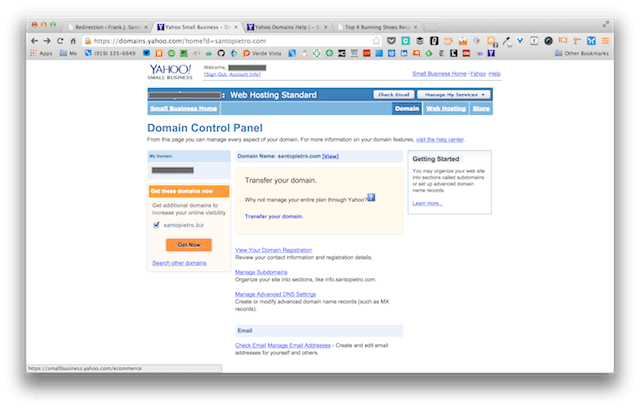
Yahoo! Domain Control Panel screenshot
It says something about these services being available to Yahoo! domain and business mail customers, but my client is a domain customer! Where we do the redirect, we don’t know. Now, the client has to call Yahoo! and learn why they can’t do something that you can do in most other services easily.
Lastly, in today’s world of WordPress hosting, even GoDaddy is getting into managed WordPress, where you don’t have to use the one-click install. WordPress is simply there when you login. That’s it. No one-click. No fuss. You see this now at WP Engine, which does a fantastic job of powering WordPress managed sites that also come with staging environments, so you can build a site in staging and then push it to live with one click. Most site with small businesses work on their LIVE site, not a staging site. It means the changes you are making to your live site are seen by all. With WP Engine, you’ll get a staging environment relatively easy to deploy and work with. Why would anyone use Yahoo! if they could use WP Engine, who deploy this functionality to every site owner? Answer – you wouldn’t. You would go right to WP Engine!
Do yourself a favor. Get off Yahoo! Small Business Hosting and move today! Need help. We can do it for you. Contact us and we’ll move your WordPress site from Yahoo! SMB to WP Engine today! You’ll get managed hosting where they do the upgrades for you! You’ll get a fantastic admin user experience. And, you’ll get peace of mind knowing that you’re not hosting with a dinosaur, but a nimble startup in Austin, TX who are working on WordPress all day, everyday.
Tony Zeoli founded Digital Strategy Works to provide small and medium size businesses with end-to-end digital strategy consulting. With over 16+ year of experience working on digital media projects for start-ups, non-profits, institutions, and corporations, Zeoli brings a wealth of experience that cuts across the digital media spectrum.


